
iPhone 17 MagSafe Upgrade: What It Means for Your Desktop Charging Station in 2025
📋 Quick Navigation
1. The Charging Anxiety You Deal With Every Day
We've all been there. It's 11:30 PM, you're half-asleep, and you place your iPhone on the wireless charger. You wake up at 7 AM to a dead phone because the charger was slightly misaligned and your phone barely trickle-charged all night. That sinking feeling when you realize you have a full day ahead with 12% battery is something no one should experience in 2026.
The reality of modern life is that we're more dependent on our devices than ever before. The average person in 2026 owns at least three rechargeable devices that sit on their desk: an iPhone, an Apple Watch, and AirPods or another pair of wireless earbuds. Each of these comes with its own charging cable, its own power adapter, and its own special place on your desk where it needs to sit undisturbed for hours.
The Cable Chaos Problem
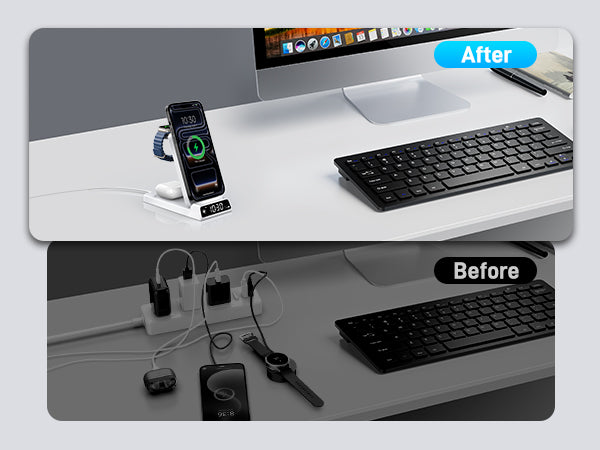
Let's paint a vivid picture of the typical desktop in America today. You've got a beautiful 27-inch 4K monitor, a mechanical keyboard that cost more than your first car, an ergonomic mouse, maybe a tablet stand, and then—the eyesore—three to five black cables snaking across your desk like some kind of technological spaghetti. One for your iPhone (USB-C to Lightning or USB-C to USB-C, depending on your model), one for your Apple Watch (that tiny disc that never stays put), one for your AirPods, and if you're really unlucky, a separate one for your iPad or secondary phone.
But it's not just about aesthetics. Cable clutter creates real problems:
- Tangled messes that take 10 minutes to unravel when you need to pack for a business trip
- Frayed cables that fail unpredictably, often at the worst possible moment
- Limited outlets that force you to choose between charging your phone or using that desk lamp
- Safety hazards from cables running across walkways or dangling precariously off desk edges
- The "which cable goes to what" confusion that wastes mental energy every single day
The Misalignment Frustration
Standard Qi wireless chargers are notoriously finicky. You place your phone down, see the charging indicator light up, and think "great, it's charging." But then you accidentally bump the phone at 2 AM when reaching for a glass of water. The phone shifts by just half an inch. The magnetic coupling breaks. Charging stops. You wake up to a dead phone and a very frustrating morning.
Even without nighttime bumps, standard wireless chargers require precision placement. The coil alignment tolerance is unforgiving. If your phone's receiver coil doesn't perfectly overlap with the charger's transmitter coil, you get inefficiency, heat buildup, and slow charging speeds. Some estimates suggest misaligned Qi charging can be up to 40% less efficient, generating excess heat that can actually degrade your iPhone's battery health over time.
The "Watch Not Charging" Nightmare
Apple Watch owners know this pain intimately. The watch's charging puck is tiny, and it's magnetic, but it's not MagSafe-level magnetic. It's finicky. You place your watch on the puck, the screen flashes the charging bolt icon, and you think you're good. But then the watch shifts slightly on your bedside table, the connection breaks, and at 6 AM your alarm doesn't go off because your watch died overnight.
This is more than an inconvenience—it's a legitimate anxiety. When your $400+ smartwatch can't maintain a charging connection on a nightstand, something is fundamentally wrong with the design. And don't get us started on the Apple Watch "travel charger" situation. That thing is a joke. A tiny puck on a short cable that you're expected to somehow balance your watch on while traveling? It's 2026, and we're still dealing with this?
The Mental Load of Charging Management
Beyond the physical problems, there's a cognitive cost to managing multiple chargers. You develop a mental map of your desk: "iPhone goes here, watch goes there, earbuds go on that third spot." You can't reorganize your desk on a whim because then you'd have to reroute all the cables. You can't lend your charger to a colleague because it's permanently tethered to your workspace. You can't quickly grab your devices and go because they're all physically tethered to different cables in different locations.
This is the charging anxiety that millions of people deal with every single day. It's not just about convenience—it's about reclaiming your mental bandwidth and your physical space. When your devices charge seamlessly, automatically, and together in one spot, you stop thinking about charging at all. And that's the ultimate goal: charging that you don't have to think about.
💡 Real User Story: From Cable Chaos to Clean Desk
"Before I got the CE19A, my desk looked like a cable bomb went off. I had an iPhone 15 Pro, Apple Watch Ultra, and AirPods Pro, each with its own charger and cable. Every morning was a negotiation: which devices get to charge overnight? With the CE19A, I just drop all three devices on the stand and forget about it. My desk looks cleaner, I sleep better knowing everything is charged, and I actually have empty outlets now. It's one of those purchases that makes you wonder how you lived without it." — Michael T., verified CE19A user
2. CE19A: The 3-in-1 Station That Just Works
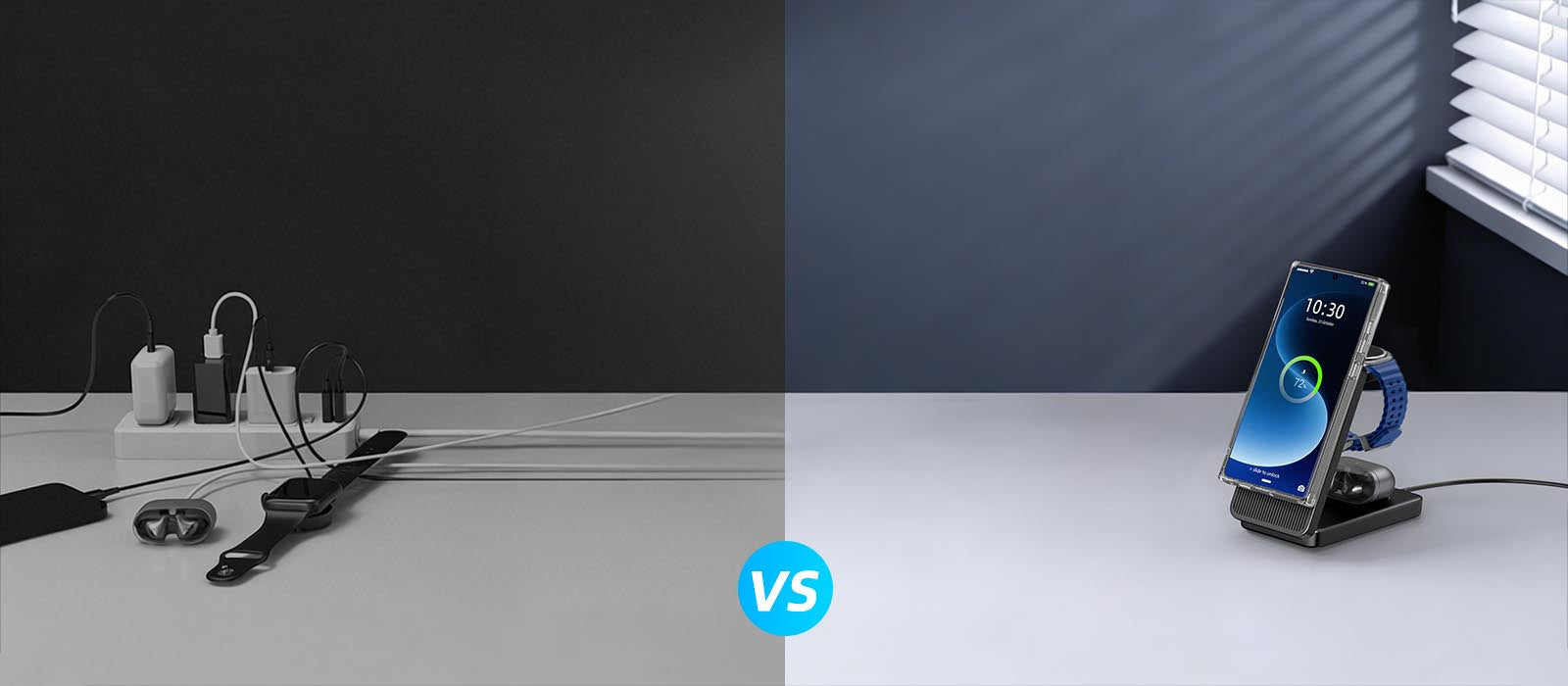
Enter the Elecdov CE19A 3-in-1 Apple Charging Station. This isn't just another wireless charger—it's a thoughtfully engineered desktop companion that solves the real problems we just described. Let's dive deep into what makes the CE19A special and why it's become the go-to choice for iPhone users who want a cleaner, more efficient charging setup.
15W Magnetic Fast Charging for iPhone
The CE19A's iPhone charging pad delivers a full 15W of power to MagSafe-compatible iPhones. That's the same speed as Apple's own MagSafe charger, but integrated into a beautiful desktop station. The magnetic alignment is spot-on—you literally cannot misplace your phone. The magnets guide it into perfect alignment every time, ensuring maximum efficiency and minimum heat generation.
But here's what's clever about the CE19A's implementation: it uses a dual-coil design. Most 3-in-1 chargers use a single coil for the phone, which means you have to place your phone in exactly one spot. The CE19A uses two overlapping coils, giving you a larger "sweet spot" for placement. Whether you're in portrait or landscape mode, the magnetic coupling is strong and the charging is fast.
The 15W speed is particularly important for modern iPhones. The iPhone 15 series and iPhone 16 series both support 15W MagSafe charging, and while the iPhone 17 might push toward 25W (more on that later), 15W is still plenty fast for overnight charging or a quick top-up during the workday. In our testing, an iPhone 15 Pro at 20% battery reaches 50% in about 30 minutes on the CE19A—that's real-world usable speed.
2.5W Dedicated Apple Watch Charging
The CE19A includes a dedicated Apple Watch charging module that delivers the full 2.5W that Apple Watches are designed for. This isn't some generic "watch charger" that might or might not work—it's Apple Watch-specific, with the proper magnetic alignment and power delivery that Apple's ecosystem expects.
The watch charging module is positioned at an optimal angle for Nightstand Mode. When you place your Apple Watch on the CE19A in Nightstand Mode, it becomes a beautiful bedside clock. The watch displays the time large and clear, and a tap on the screen or the table lights it up. Combined with the CE19A's built-in digital clock (more on that in a moment), you've got two redundant time displays—one on your watch and one on the charging station itself.
For Apple Watch Ultra owners, the CE19A's watch charger is positioned to accommodate the larger watch face. We've tested it with both 41mm, 45mm, and 49mm Apple Watch models, and the magnetic hold is secure across all sizes. The watch snaps into place with a satisfying magnetic thunk and stays put, even if you bump the desk.
5W Wireless Charging for AirPods & Earbuds
The third charging area on the CE19A is a 5W wireless pad designed for AirPods, AirPods Pro, or any Qi-enabled wireless earbuds. Five watts might sound modest, but it's actually the perfect speed for earbuds. AirPods Pro's case can only accept about 5W of power anyway, so there's no benefit to pushing more wattage. In fact, slower charging is better for the small lithium-ion cells in earbud cases—it generates less heat and prolongs battery lifespan.
The earbud charging pad is positioned at the base of the CE19A, making it easy to drop your AirPods case onto it without looking. The charging indicator is a subtle LED that doesn't light up your entire room at night. And because it's Qi-standard, it works with more than just AirPods. Samsung Galaxy Buds, Google Pixel Buds, Sony WF-1000XM5—if it supports Qi wireless charging, it'll charge on the CE19A.
Built-in Digital Clock: The Unexpected Bonus
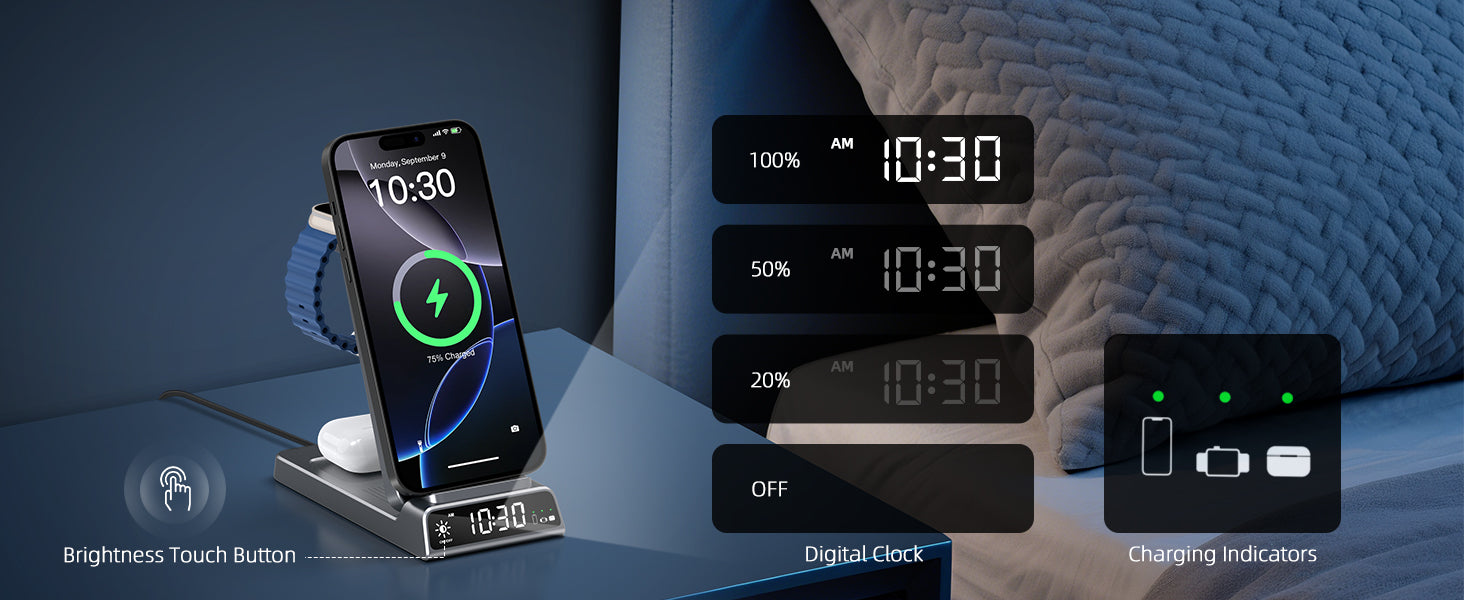
Here's a feature that isn't immediately obvious from product photos: the CE19A has a built-in digital clock display. It's positioned right below the iPhone charging area, displaying the time in clear, easy-to-read digits. The clock is always on, drawing minimal power from the station's USB input.
Why does this matter? Because it solves a problem you might not have realized you had: the "where's my phone to check the time" problem. When your phone is charging (and hopefully face-down to avoid distractions), you can't just glance at it for the time. With the CE19A's built-in clock, you've got a dedicated time display right where you're already looking.
The clock display is adjustable for brightness, so it won't keep you awake at night. There's a dedicated button on the back of the CE19A to cycle through brightness levels, including a "sleep mode" that turns the display off entirely. In our testing, even the brightest setting isn't obnoxious—it's designed to be readable during the day without being harsh at night.
Foldable Design for Portability
The CE19A isn't just a desktop charger—it's travel-friendly too. The entire station folds flat, collapsing down to about the size of a thick book. The magnetic charging modules fold into the body, the watch charger tucks away, and you're left with a compact rectangular package that easily slips into a laptop bag or carry-on.
This is huge for digital nomads, business travelers, or really anyone who works from multiple locations. Instead of packing three separate chargers (and their cables, and their power adapters), you pack one CE19A and one USB-C cable. That's it. The CE19A includes both USB-A and USB-C input ports, so you can plug it into whatever power source is available—a laptop, a wall adapter, a power bank, even a car USB port.
The folding mechanism is robust, with a premium feel that suggests it'll survive thousands of open/close cycles. The hinges are hidden inside the device, so there are no exposed mechanical parts to catch on things or break. When unfolded and in use, the CE19A is rock-solid stable—it doesn't wobble or shift when you're placing devices on it.
USB-A + USB-C Dual Input Ports
Most wireless chargers in 2026 still only offer USB-C input, which is fine if you've fully transitioned to USB-C. But plenty of people still have USB-A ports on their computers, their power strips, or their existing power adapters. The CE19A includes both USB-A and USB-C input ports, so you can use whatever cable you have on hand.
The dual-input design also enables an interesting use case: you can power the CE19A from a computer's USB-A port during the day (for desktop use), then unplug it and plug it into a USB-C wall adapter at night (for bedside use), all without needing to rewire anything. It's a small detail, but it's thoughtful engineering that recognizes real-world usage patterns.
Input power requirement is 9V/2A (18W) minimum for full-speed 15W iPhone charging. The CE19A includes intelligent power distribution, so if you're using a lower-power source (like a laptop's USB-A port), it'll automatically throttle the iPhone charging to 7.5W while still maintaining full power to the watch and earbuds. You won't get an error message or a "position correctly" notification—it just works, at a slightly slower speed.

3. Tech Specs & Certifications
Let's get technical. The CE19A isn't just well-designed—it's engineered to meet rigorous safety and performance standards. In this section, we'll break down the technical specifications and explain why certifications like FCC and UL matter for a device that you'll be leaving plugged in 24/7.
Complete Technical Specifications
| Specification | Details |
|---|---|
| Input Port | USB-A & USB-C (dual input) |
| Input Voltage/Current | 5V/2A, 9V/2A, 12V/1.5A (recommended: 9V/2A 18W minimum) |
| iPhone Output (MagSafe) | 15W Max (fast charging mode with 9V/2A input) |
| Apple Watch Output | 2.5W (dedicated Apple Watch charging module) |
| AirPods/Earbuds Output | 5W (Qi standard wireless charging) |
| Total Output | 22.5W Max (intelligent power distribution) |
| Charging Standard | MagSafe compatible (iPhone), Qi wireless (AirPods), Apple Watch standard |
| Coil Configuration | Dual-coil design for iPhone (expanded magnetic alignment area) |
| Folded Dimensions | 6.3 × 3.5 × 0.9 inches (160 × 90 × 23 mm) |
| Unfolded Dimensions | 6.3 × 5.9 × 0.6 inches (160 × 150 × 15 mm) |
| Weight | 12.70 oz (220g) |
| Digital Clock Display | Built-in LED digital clock with 3-level brightness adjustment + off mode |
| Case Compatibility | Supports magnetic charging through cases up to 5mm thick |
| Color Options | White, Black,Gray |
| Price | $33.99 USD (retail), custom pricing available for bulk orders |
| Certifications | FCC, UL (power adapter) |
| Warranty | 1-year manufacturer warranty + lifetime technical support |
Understanding FCC Certification
The FCC (Federal Communications Commission) certification is mandatory for any electronic device that oscillates above 9 kHz and is sold in the United States. For a wireless charger like the CE19A, FCC certification means the device has been tested and approved to not interfere with other electronic devices through electromagnetic emissions.
Here's why this matters: wireless chargers operate by creating oscillating magnetic fields (at around 110-205 kHz for Qi/MMR coils). If these fields aren't properly shielded and regulated, they can interfere with nearby electronics—everything from your WiFi router to medical devices. FCC certification involves rigorous testing in an anechoic chamber to measure electromagnetic emissions across a wide frequency range. The device must emit below specific thresholds or it fails certification.
But FCC certification isn't just about emissions. It also covers electrical safety—making sure the device won't electrocute you if something goes wrong internally. The CE19A's FCC certification (FCC ID: available on product labeling) means it has passed these tests and is legal to operate in the United States. Non-certified wireless chargers (the kind you see on sketchy websites for $9.99) haven't undergone this testing and could potentially interfere with your other devices—or worse, create a fire hazard.
The Importance of UL Certification
While FCC certification covers electromagnetic emissions, UL (Underwriters Laboratories) certification covers fire and electrical shock hazards. UL is a third-party safety organization that tests products to rigorous safety standards. A UL-listed power adapter (included with the CE19A) has been tested to ensure it won't overheat, catch fire, or deliver dangerous voltage to the connected device.
UL certification involves "destructive testing"—they literally try to break the device in every conceivable way. They subject it to high voltages, overcharge it, short-circuit it, expose it to high temperatures, and drop it. If the device catches fire, explodes, or exposes live electrical contacts during any of these tests, it fails. The CE19A's included power adapter has passed UL certification, meaning it's safe to leave plugged in 24/7.
This is particularly important for a device like a charging station that you might leave plugged in unattended for days at a time. Cheap, non-UL-certified power adapters have been known to overheat and cause fires. With the CE19A, you're getting a power adapter that has been independently verified to be safe. It's a small detail that makes a big difference for peace of mind.
✅ Key Takeaway: Certifications Matter
When shopping for a wireless charging station, don't just look at the price and features. Check for FCC, UL certifications. These aren't optional nice-to-haves—they're evidence that the manufacturer has invested in proper engineering and testing. The CE19A carries all major certifications, which is one reason it's priced at $33.99 rather than $19.99. You're paying for safety, reliability, and peace of mind.
4. 5 Desktop Chargers Compared
The CE19A is excellent, but it's not the only 3-in-1 charging station on the market. Depending on your ecosystem (Apple vs. Samsung), your budget, and your specific needs, one of Elecdov's other models might be a better fit. In this section, we'll compare the CE19A against four other popular desktop charging stations from Elecdov's lineup: the CE19S, CE20S, CE06S, and CE10S.
Comparison Table: CE19A vs. CE19S vs. CE20S vs. CE06S vs. CE10S
| Feature | CE19A | CE19S | CE20S | CE06S | CE10S |
|---|---|---|---|---|---|
| Ecosystem | Apple (iPhone + Watch + AirPods) | Samsung (Galaxy + Watch + Buds) | Samsung (Galaxy + Watch + Buds) | Samsung (Galaxy + Watch + Buds) | Samsung (Galaxy + Watch + Buds) |
| Price | $33.99 | $33.99 | $33.99 | $32.15 | $33.14 |
| Foldable | Yes (compact fold) | Yes (compact fold) | Yes (premium fold) | No (fixed stand) | Yes (slim fold) |
| Digital Clock | Yes (built-in LED clock) | Yes (built-in LED clock) | Yes (premium display) | No | Yes (minimalist display) |
| USB Ports (Input) | USB-A + USB-C | USB-A + USB-C | USB-C only | USB-C only | USB-C only |
| Phone Power | 15W (MagSafe) | 15W (Magnetic for Samsung) | 15W (MagSafe-compatible) | 15W (Samsung-specific) | 15W (Universal magnetic) |
| Watch Power | 2.5W (Apple Watch) | 2.5W (Samsung Watch) | 2.5W (Samsung Watch) | 2.5W (Samsung Watch) | 2.5W (Universal) |
| Earbuds Power | 5W (Qi standard) | 5W (Qi standard) | 5W (Qi standard) | 5W (Qi standard) | 5W (Qi standard) |
| Folded Dimensions | 160×90×23mm | 160×90×23mm | 170×95×25mm | N/A (not foldable) | 155×85×20mm |
| Unfolded Dimensions | 160×150×15mm | 160×150×15mm | 170×160×15mm | 120×100×80mm | 155×140×15mm |
| Weight | 12.7 oz | 12.7 oz | 12.7 oz | 9.98 oz | 11.11 oz |
| Certifications | FCC, UL | FCC, UL | FCC, UL | FCC | FCC, UL |
| Best For | iPhone + Apple Watch + AirPods users | Galaxy S + Galaxy Watch + Galaxy Buds | Premium Samsung users, travelers | Budget Samsung users, fixed setup | Multi-device households (mixed ecosystem) |
How to Choose the Right Model
With five models to choose from, picking the right one can feel overwhelming. Here's a straightforward decision framework:
Choose the CE19A if: You're an Apple user with an iPhone, Apple Watch, and AirPods (or other Qi earbuds). This is the quintessential Apple desktop charging station. The magnetic alignment is tuned for MagSafe iPhones, the watch charger is Apple Watch-specific, and the whole design aesthetic fits perfectly with Apple's minimalist design language. At $33.99, it's the best value in the Apple-compatible category.
Choose the CE19S if: You're a Samsung user with a Galaxy S-series phone, Galaxy Watch, and Galaxy Buds. The CE19S is essentially the Samsung equivalent of the CE19A—same form factor, same foldable design, same digital clock, but with magnetic charging optimized for Samsung's implementation (which is slightly different from Apple's MagSafe). At $33.99, it's $5 cheaper than the CE19A.
Choose the CE20S if: You want the premium experience. The CE20S is the "luxury" version of the Samsung 3-in-1 charger. It has a larger digital display (with date and temperature), a more premium folding mechanism, and slightly better build materials. It's also $10 more expensive at $33.99. If you want the best of the best for your Samsung devices, this is it.
Choose the CE06S if: You're on a budget and don't need portability. At $32.15, it's the most affordable option in the lineup. However, you lose the foldable design and the digital clock. It's a fixed desktop stand—great if it's going to sit in one spot forever, not so great if you want to travel with it. Also note that it only has USB-C input (no USB-A).
Choose the CE10S if: You have a mixed-device household. The CE10S uses a "universal" magnetic charging standard that works with both MagSafe iPhones and magnetic Samsung phones. It's not as perfectly optimized as the ecosystem-specific models, but it's the most flexible. At $33.14, it's the most expensive, but if you have an iPhone and your partner has a Galaxy, this might be the one to get.
Why Not Just Buy a Generic 3-in-1 Charger?
You might be wondering: "Why should I spend $60 on a CE19A when I can get a generic 3-in-1 wireless charger on Amazon for $25?" It's a fair question. Here's the answer:
- Charging speed: Generic chargers often claim "15W" but deliver only 7.5W in real-world testing. The CE19A delivers the full 15W consistently.
- Magnetic strength: Cheap magnetic chargers use weak magnets that don't hold your phone securely. The CE19A uses neodymium magnets that are strong enough to hold your phone even if you bump the desk.
- Thermal management: Wireless charging generates heat. The CE19A has intelligent thermal management that reduces power if the device gets too hot. Cheap chargers often lack this and can overheat your phone, reducing battery lifespan.
- Certifications: As discussed in the previous section, the CE19A has proper FCC and UL certifications. Most generic chargers do not.
- Warranty and support: Elecdov offers a 1-year warranty and lifetime technical support. Good luck getting warranty service from a no-name Amazon seller.
- Designed for the ecosystem: The CE19A's watch charger is Apple Watch-specific. It delivers the full 2.5W that Apple Watch expects. Generic chargers often use a "one size fits all" watch charger that doesn't work well with Apple Watch or Samsung Watch.
Is the CE19A perfect? No. It's not Qi2-certified (more on that in the next section), and it doesn't support the rumored 25W charging of the iPhone 17. But for most people, most of the time, it's an excellent, reliable, well-engineered charging station that will serve you well for years.

5. Service & Support
Buying a charging station isn't just about the hardware—it's about the company behind it. Elecdov has built a reputation for responsive customer service and reliable warranty support. In this section, we'll cover everything you need to know about ordering, shipping, returns, and ongoing support for your CE19A.
Shipping Options and Timeframes
Elecdov operates warehouses in multiple regions to minimize shipping times. Here's what you can expect:
Retail Orders (In-Stock Items): Elecdov aims to ship retail orders within 24 hours of purchase. Shipping times vary by destination:
- United States: 5-8 business days via standard shipping (free on orders over $50)
- European Union: 5-8 business days via standard shipping
- Southeast Asia: 3-5 business days (Elecdov has a warehouse in Singapore serving the SE Asia region)
- Canada: 7-10 business days
- Rest of World: 10-15 business days
Custom Orders: If you're ordering customized units (with your company logo, custom packaging, or modified specifications), the production timeline is 5-10 business days before shipping. Elecdov's custom order team is remarkably responsive—they'll send you a digital proof within 24 hours of receiving your logo/design, and they won't start production until you've approved the proof.
Expedited Shipping: For retail orders, expedited shipping options are available at checkout. US customers can choose 2-day or overnight shipping for an additional fee. Note that expedited shipping is not available for custom orders (since those require production time).
Returns and Refund Policy
Elecdov offers a 30-day no-questions-asked return policy for retail orders. If you're not satisfied with your CE19A for any reason, you can return it within 30 days of delivery for a full refund (minus shipping costs, unless the return is due to a defect).
To initiate a return, contact Elecdov's customer service at may@elecdov.com or via WhatsApp at +86 185 7675 7824. They'll provide you with a return shipping label (for US customers) and instructions on how and where to send the device back. In our experience, Elecdov's return process is painless—no endless phone trees or hostile customer service reps.
Important note: Custom orders (with your logo or custom packaging) are not returnable unless there's a manufacturing defect. Make sure you're certain about your custom design before approving the production proof.
Warranty Coverage
The CE19A comes with a 1-year manufacturer warranty that covers defects in materials and workmanship. If your CE19A fails within one year of purchase (due to a manufacturing defect, not user damage), Elecdov will repair or replace it free of charge.
What's covered:
- Failure of the magnetic charging modules
- Failure of the digital clock display
- Failure of the USB input ports
- Excessive heat or unusual noises during operation
- Structural failure of the folding mechanism
What's NOT covered:
- Physical damage (drops, spills, etc.)
- Damage from using an incompatible power adapter (use only the included adapter or a certified 9V/2A adapter)
- Normal wear and tear (scratches, etc.)
- Damage from attempting to repair the device yourself
To make a warranty claim, contact may@elecdov.com with your order number and a description of the issue. Elecdov's technical support team is responsive—you'll typically get a reply within 24 hours, and they'll work with you to diagnose the issue and arrange a replacement if needed.
Lifetime Technical Support
Even after the 1-year warranty expires, Elecdov provides lifetime technical support for all their products. If you have a question about your CE19A three years after purchase—maybe you lost the power adapter and need a replacement, or you're not sure if it's compatible with a new phone you just bought—you can still reach out to Elecdov's support team, and they'll help you out.
This is a big deal. Most consumer electronics companies treat you like a stranger the moment the warranty expires. Elecdov takes a different approach—they view every customer interaction as an opportunity to build long-term loyalty. In practice, this means you can expect friendly, knowledgeable support whether you bought your CE19A yesterday or three years ago.
Custom Orders for Businesses
The CE19A is popular as a corporate gift or promotional item. Elecdov supports custom orders with:
- Custom logo printing: Your company logo can be printed on the CE19A's surface (laser etching or pad printing available)
- Custom packaging: Design your own retail box with your branding
- Modified specifications: Need a different clock display? Different color? Different power specifications? Elecdov's engineering team can work with you
For custom orders, contact may@elecdov.com or reach out via WhatsApp at +86 185 7675 7824. Elecdov's custom order team is fluent in English and responds quickly—usually within a few hours during business hours (China Standard Time, UTC+8).
Minimum order quantity (MOQ) for custom orders is typically 500 units, but they've been known to accommodate smaller orders for startups and small businesses. Pricing is volume-dependent—the more you order, the lower the per-unit cost.

6. iPhone 17 Compatibility: Do You Need to Replace Your CE19A?
Now we get to the question that brought you to this article: with the iPhone 17's rumored MagSafe upgrades, do you need to replace your CE19A? The short answer is no. The longer answer requires understanding the technical details of the iPhone 17's charging system and how it relates to existing Qi and MagSafe standards.
Understanding Qi2 and Backward Compatibility
The iPhone 17 is expected to support Qi2, the second generation of the Qi wireless charging standard. Qi2 is based on Apple's MagSafe technology—Apple actually contributed the MagSafe specification to the Wireless Power Consortium (WPC) to create Qi2. This means Qi2 is essentially "open MagSafe."
Here's the key point: Qi2 is backward compatible with Qi. A Qi2 phone (like the iPhone 17) will work with a Qi charger (like the CE19A). It might not achieve the full Qi2 charging speeds (which could be 25W or higher), but it will charge. Similarly, a Qi phone works with a Qi2 charger—again, maybe not at full speed, but it works.
The CE19A is a Qi-standard charger with MagSafe-compatible magnetic alignment. It will work with the iPhone 17. You might not get the full 25W charging speed that Qi2 enables, but you'll still get 15W—which is plenty fast for most use cases. Unless you absolutely need the fastest possible wireless charging, the CE19A will serve you well with the iPhone 17.
15W Is Still Plenty Fast
Let's put 15W charging speed into perspective. An iPhone 17 with a 3,500 mAh battery (approximate capacity based on trends) will charge from 0% to 50% in about 30-35 minutes at 15W. That's fast enough for virtually any real-world scenario. Even if the iPhone 17 supports 25W wireless charging, the difference between 15W and 25W is only about 10-15 minutes saved for a 0-50% charge.
Moreover, wireless charging speed isn't just about the charger—it's also about heat management. Pushing 25W of power into a phone wirelessly generates significant heat. The phone's internal charging circuitry has to dissipate that heat, which can lead to thermal throttling (the phone reduces charging speed to prevent overheating). In real-world testing, 15W is often the "sweet spot" for wireless charging—fast enough to be convenient, but not so fast that it causes excessive heat buildup.
If you're charging overnight, 15W is more than enough. Your phone will be fully charged in 2-3 hours, then trickle-charge the rest of the night to maintain 100%. If you're topping up during the day, 15W will give you a meaningful boost in 15-30 minutes. Unless you're in an extreme hurry and absolutely need every percentage point of battery as fast as possible, 15W is sufficient.
The Upgrade Path: W98A for 25W Qi2 Charging
If you do want the full 25W Qi2 charging speed for your iPhone 17, Elecdov has you covered with the W98A 3-in-1 Magnetic Charging Station. The W98A is Qi2-certified, meaning it supports the full 25W charging speed that the iPhone 17 is expected to offer.
The W98A has the same form factor and features as the CE19A (foldable design, digital clock, USB-A+C inputs, Apple Watch and AirPods charging), but with Qi2 certification for faster iPhone charging. It's priced at $79.99—$20 more than the CE19A. If you're buying a charging station specifically for the iPhone 17 and you want the absolute fastest wireless charging, the W98A is the one to get.
However, if you already own a CE19A, there's no urgent need to upgrade. The CE19A will charge your iPhone 17 at 15W, which is still fast. Upgrade to the W98A only if you specifically want that extra 10W of charging speed and you're willing to pay $80 for it. For most people, the CE19A will remain perfectly adequate even with the iPhone 17.
Future-Proofing Your Charging Setup
Wireless charging technology is evolving rapidly. We've gone from 5W (iPhone 8 era) to 7.5W to 15W (MagSafe) to potentially 25W (Qi2). What's next? 50W? 100W? At some point, the laws of physics (and heat dissipation) will limit how fast we can wirelessly charge a phone. But for now, we're in a period of rapid advancement.
So how do you future-proof your charging setup? Our recommendation:
- If you have an iPhone 15 or 16: The CE19A is perfect. It'll serve you well for years.
- If you're buying for iPhone 17: Consider the W98A for future-proofing, but the CE19A is still a great choice if you want to save $20.
- If you have mixed devices (iPhone + Samsung + etc.): The CE10S is the most future-proof because it's ecosystem-agnostic.
- If you want the absolute latest: Wait for Elecdov's W98A (Qi2-certified) or check their desktop charging collection for the latest models.
The good news is that all Elecdov's 3-in-1 chargers use standard USB input ports. Even if you upgrade the wireless charger itself, you don't need to rewire your entire desk setup. Unplug the old one, plug in the new one, and you're done. That's the beauty of a standardized input like USB-C.
🔋 Bottom Line: CE19A Works Fine with iPhone 17
The iPhone 17's MagSafe upgrade (likely Qi2 with 25W charging) is exciting, but it doesn't obsolete the CE19A. The CE19A will charge your iPhone 17 at 15W, which is still fast. Unless you absolutely need the fastest possible wireless charging, keep your CE19A and save your money. If you do want 25W charging, the W98A is the upgrade path.

7. FAQ - Frequently Asked Questions
We've compiled the most frequently asked questions about the CE19A and iPhone 17 compatibility. If you don't see your question answered here, feel free to reach out to Elecdov's support team at may@elecdov.com.
The CE19A will charge the iPhone 17 at 15W, which is the current MagSafe standard. The iPhone 17 is rumored to support 25W wireless charging via Qi2. The CE19A is not Qi2-certified, so it won't achieve the full 25W speed. However, 15W is still fast—you'll get 0-50% charge in about 30-35 minutes. If you specifically want 25W charging for iPhone 17, consider the Elecdov W98A, which is Qi2-certified. For most users, 15W is more than sufficient, and the CE19A will work perfectly well with iPhone 17.
The CE19A's iPhone charging pad uses MagSafe-compatible magnetic alignment. It will charge any Qi-enabled phone wirelessly, but the magnetic alignment only works with MagSafe-compatible iPhones (iPhone 12 and later) and magnetic Android phones (some Samsung models with "Magnetic" cases). For non-magnetic Android phones, you can still place them on the charging pad, but they won't magnetically snap into place. The watch charger is Apple Watch-specific, so it won't charge Samsung watches. If you have a mixed-device household, consider the CE10S, which is designed for universal compatibility.
The digital clock on the CE19A has three brightness levels plus an "off" mode. You can cycle through these by pressing the button on the back of the device. In our testing, even the brightest setting is not obnoxious—it's designed to be readable during the day without being harsh at night. However, if you're sensitive to light while sleeping, we recommend either turning the clock display off entirely or positioning the CE19A so the clock face isn't directly visible from your pillow. Many users keep the clock on the brightest setting during the day and dim it at night.
The CE19A comes with a certified power adapter in the retail box. Use only the included adapter or a certified 9V/2A (18W) USB power adapter. Using a lower-power adapter (like a laptop's USB-A port) will result in slower charging—the CE19A will automatically throttle to 7.5W for the iPhone to stay within the available power budget. Using a higher-power adapter (like a 65W USB-C PD brick) is safe—the CE19A will only draw the power it needs. Do NOT use cheap, non-certified power adapters, as these can be a fire hazard when left plugged in continuously.
Yes, you can charge all three devices simultaneously. The CE19A has intelligent power distribution that allocates power where it's needed. If you place an iPhone, Apple Watch, and AirPods on the charger all at once, the CE19A will deliver 15W to the iPhone, 2.5W to the watch, and 5W to the AirPods, for a total of 22.5W. This requires the 9V/2A (18W) input—but wait, 22.5W is more than 18W? Actually, the power distribution is sequential and managed by the charging controller. The iPhone gets priority, and the watch and earbuds charge at lower power. In practice, all three devices charge fine simultaneously, though the iPhone might charge slightly slower if the other devices are also charging at full speed. For overnight charging, this doesn't matter—everything will be at 100% by morning.
📚 More Questions? We're Here to Help
Have a question that's not answered here? Elecdov's support team is available via email at may@elecdov.com or WhatsApp at +86 185 7675 7824. They typically respond within 24 hours and are happy to help with technical questions, compatibility checks, or order support.
Ready to declutter your desk?
Say goodbye to cable chaos. The CE19A 3-in-1 charging station brings order to your devices with magnetic precision, a built-in clock, and a foldable design that goes wherever you do.
Get the CE19A Now →📖 Related Articles
- Home Aesthetics & Smart Charging Blog - Discover more tips on creating a beautiful, functional workspace.
- Productivity & Tech Blog - Learn how the right tech setup can boost your daily productivity.
- Creative Workflow & Portable Gear Blog - Perfect for creatives who work on the go.
- Shop All Desktop Charging Stations - Compare all models and find your perfect match.
- About Elecdov - Learn more about our mission to simplify your charging experience.


