
The Watch Sleeps on Your Wrist Now: Rebuilding the Galaxy Bedside for Overnight Tracking
Quick read
This piece stays inside the Samsung ecosystem — Galaxy phones, Watch, Buds and Ring — and uses only figures published by Samsung or by the Elecdov listings.
- What this is
- A bedroom design guide for the moment a Galaxy Watch stops sleeping on its charger and starts sleeping on your wrist.
- The core problem
- Overnight tracking removes the watch's eight-hour charging window, while Samsung states that older pads charge a Watch9 or Watch Ultra2 more slowly — so the dock now has to finish in daylight.
- What you will learn
- Samsung's exact requirements for the feature, why Wireless power sharing is not the fallback, how the watch must sit on a pad, and where three charging positions belong on a bedside surface.
- Product guidance
- Three Elecdov Samsung stations — a 25W Qi foldable, a clock station with USB outputs, and a compact clock station — compared cell by cell.
- Best for
- Galaxy Watch9 or Watch Ultra2 owners who plan to wear the watch to bed, and anyone rebuilding a nightstand around a health routine rather than a cable.
What changed on 3 November: the watch takes the night shift
On 3 November 2026 Samsung announced that its updated Sleep Apnea feature is available on Galaxy Watch and Galaxy Ring. The company calls it the first time sleep apnea risk detection has been offered on a smart ring, and says the revised algorithm reports the level of breathing disruptions detected rather than only a risk score. The regulatory trail: FDA clearance in July 2026, then approval from Korea's Ministry of Food and Drug Safety.
The sentence that matters for a bedroom sits in the footnote: the feature is an over-the-counter, software-only application for users 18 and older, over a two-night monitoring period, requiring two nights of valid data within a 10-day period. A second footnote names Galaxy Watch 9, with Watch 7 and 8 to follow through software updates.
Read that as a furniture brief. A device that spent every night on a puck now spends two nights in ten on your wrist — and more, once the readings prove useful. The watch has become a body-worn object, and the bedside has not been redesigned to match. The compatibility boundary for Galaxy S26 Ultra, Watch9 and Watch Ultra2 is where most owners first notice the mismatch.
| Point | What it means at the bedside |
|---|---|
| Two nights of valid data in ten days | The watch is worn in bed on purpose, so charging moves into daylight. |
| Galaxy Watch 9 named first | Newer watches get the feature now; older models wait for software updates. |

The dock loses eight hours a night
Every bedside routine rests on an unwritten assumption: the watch sleeps where the phone sleeps. Puck at midnight, off at seven — far more charging time than the watch needs. Take the watch to bed and the block does not shrink; it disappears.
What remains is a daytime slot: the twenty minutes between shower and door, plus whatever the evening offers. That is a different kind of charging — shorter, less predictable, unforgiving of a slow pad. Samsung's charger guide is blunt: using an older wireless charging pad with a Galaxy Watch9 or Galaxy Watch Ultra2 results in slower charging, and asks owners to use the included accessory or a Samsung accessory confirmed for the model.
A second consequence catches people on a Monday: wireless power sharing is not a fallback. The same guide states that the Galaxy Watch Ultra2 and Galaxy Watch9 series do not support Wireless power sharing, and that the feature is absent from the Watch7 series and newer. If the watch is worn overnight, the dock stops being a convenience and becomes the only route.
| Point | What it means at the bedside |
|---|---|
| Night slot: phone and Buds | The two bays that used to share the evening now own it outright. |
| Day slot: watch only | A short, repeatable top-up that needs a pad rated for the model — and no reverse-charging plan B. |

The morning window is short, so the pad has to be the right one
A watch with thirty minutes a day turns charging speed into a scheduling constraint.
First, the pad. Samsung's warning is a compatibility statement about a generation of watch coils. The fix is unglamorous: the charger in the box, a Samsung accessory confirmed for the model, or a station whose page names your exact watch. That clause matters, because a station can be Qi2.2 certified on the phone side and still list an older watch range. The Watch 9 charging bay question is really a question about which list the page prints.
The second is the adapter. Samsung says the included charger's power adapter should provide at least 5 V and 2 A. Almost any modern adapter clears that — but a bedside socket shared with a lamp and a laptop dock is where a 1 A adapter from a drawer gets substituted.
Then the physical fit. Samsung notes that some watch bands prevent the watch from resting flat against the charging surface and may need to be removed. A watch that has just spent eight hours on a wrist, with a damp band, is the least cooperative version of that problem.
| Point | What it means at the bedside |
|---|---|
| Pad matched to the model | Older pads charge Watch9 and Ultra2 more slowly; read the watch range, not just the phone range. |
| Adapter at 5 V / 2 A or better | Give the station its own adapter instead of sharing a low-current one with a lamp. |
| Watch must lie flat | A thick or wet band can hold the case off the coil; a dock that lets the band fall away solves it. |

What a bedside station is actually for now
A bedside station does three jobs: a landing point per device, no cable across the surface, and a clock you can read in the dark. Overnight tracking changes the emphasis, not the job list.
The phone bay becomes the anchor. It is the only device that still charges all night, and the one whose screen you do not want glowing at 2 a.m. A magnetic stand holding the phone upright and angled solves both: continuous charging, no face-up panel broadcasting notifications at the ceiling.
The watch point becomes a morning station. That is placement, not power. A morning hand holds a watch, a toothbrush or a coffee; it is not free to fiddle with alignment. So the watch goes at the front edge, where the case drops onto the coil and the band hangs off the side — not behind the phone.
The Buds pad becomes the quiet one. Cases charge well inside a night, and they are the device most likely to be nudged off centre by a strap. Separating the two is the difference between a full case at 7 a.m. and an empty one. If your bedside has been through several layouts, the clutter-free bedside design notes cover the failure modes.
| Point | What it means at the bedside |
|---|---|
| Phone bay: overnight anchor | Rear of the surface, upright, screen angled away from the pillow. |
| Watch point: morning drop zone | Front edge, clear of the phone, with room for the band to hang. |
| Buds pad: separate and flat | Kept away from the strap so the case stays centred. |

Light, sound and the 3 a.m. rule
A bedroom charging corner is judged twice: in daylight, when it must look like furniture, and at 3 a.m., when it must be invisible. The second is harder, and overnight tracking makes it more frequent — there is now a device on your wrist that also wants to tell you things.
Start with the clock. A station display is useful at 6 a.m. and hostile at midnight; the difference is brightness control. A dimmable clock turns down to a level readable from the pillow without lighting the wall. It is the most valuable aesthetic feature a bedside station can carry, and it is published on the listing when it exists — not inferred from a photograph.
Next, the phone. Face-up, it becomes a small light source every time a notification lands. Upright on a magnetic stand, angled toward the dark corner, most of that disappears. If the phone bay lies flat, the ceiling learns about every email.
Then the watch. Wearables still wake on wrist movement, and a dock at the edge of the bed is where a dropped watch lands at 3 a.m. with a sound that ends the night. A raised lip or magnetic cradle rather than a bare pad is the physical answer — what keeps the watch aligned also keeps it quiet. The five bedroom scenarios where cables disappeared all start here: nothing loose on the surface.
| Point | What it means at the bedside |
|---|---|
| Dimmable clock, not a bright one | Readable from the pillow, invisible from the doorway. |
| Phone upright, screen angled away | Stops the nightstand becoming a notification light source. |
| Nothing loose at the edge | A cradled watch cannot be knocked onto the floor in the dark. |

Geometry: one hand, one reach, one socket
Most bedside charging problems are geometric, not electrical. Three measurements decide whether a setup survives a morning.
One hand. The surface has to be reachable without sitting up, which rules out the far corner of a wide nightstand and any spot behind a lamp. If you have to lean, you will eventually abandon the dock for a cable on the floor. The watch position is the one most often placed badly: nearest the bed, not the wall.
One socket. A station with a published input rating is a modest load; the risk is the strip behind the nightstand carrying a lamp, a diffuser, a laptop charger and a heater. Samsung's thermal guidance applies: if the watch or charger becomes too hot, charging may slow down or stop temporarily. At a bedside, heat is rarely the charger's fault — it is the bedding and the missing airflow.
One clear surface. Samsung warns against placing metal or magnetic objects — coins, magnetic cards — between watch and pad, because they can interfere with charging and cause overheating. A nightstand is where coins, keys and hotel cards live; a station with a defined footprint gives them a tray beside it instead. Starting from an empty room instead? The zero-standby layout method places the socket before the furniture.
| Point | What it means at the bedside |
|---|---|
| Reachable without sitting up | Watch point nearest the bed; nothing valuable behind a lamp. |
| Its own socket and airflow | Not on a strip shared with a heater, and not on a bedspread. |
| Metal stays off the pad | Coins, keys and cards get a tray, not the charging surface. |

Three Elecdov stations for the new bedside
All three are built for the Samsung ecosystem, and every figure below comes from the published listing: Product Features, Compatible Devices and Specifications. They separate by role: a 25W phone pad with active cooling, a clock station with wired outputs, and a compact clock station.
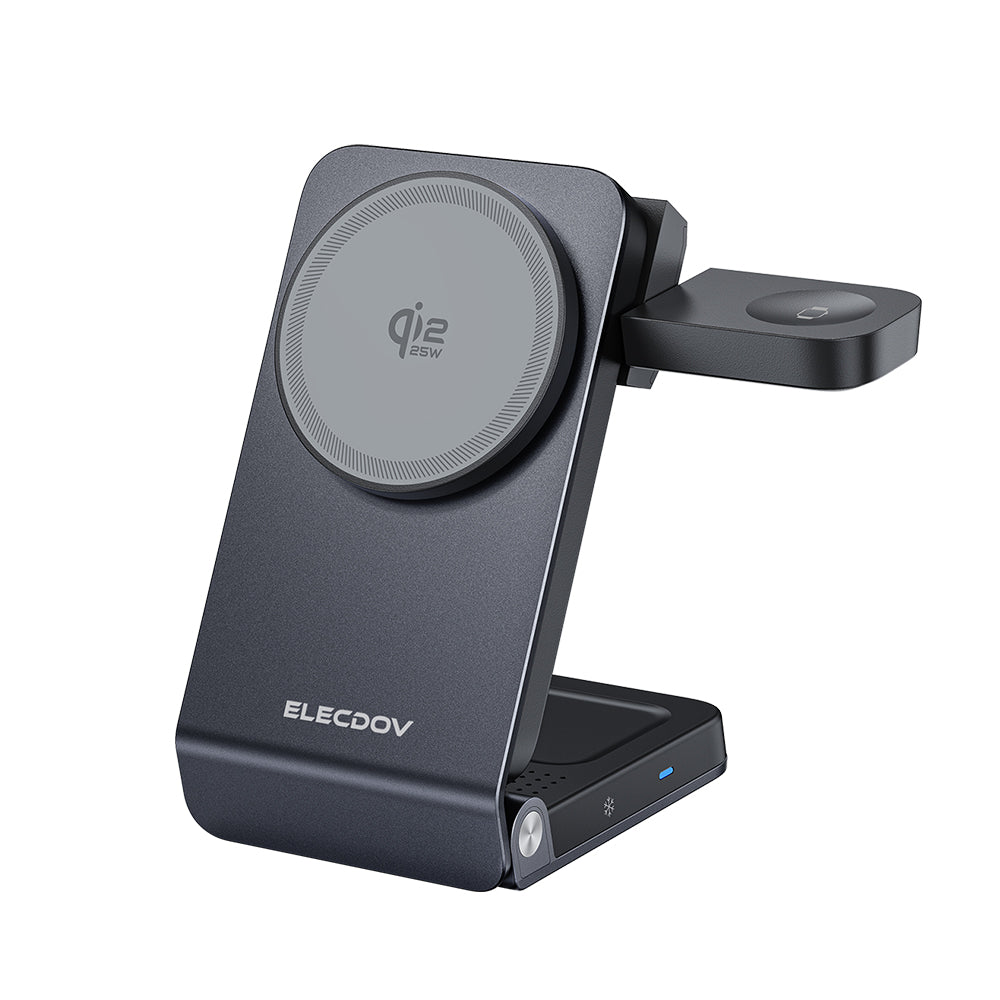
Elecdov W103S 3-in-1 Magnetic Charging Station for Samsung, Qi2.2 Certified — Includes Charger Plug
SKU: W103S · Built-in quiet cooling fan · Foldable
- 3-in-1 Qi2.2 charging with a published phone output of 25W max — the highest of the three.
- Quiet cooling fan; magnetic auto-alignment for portrait or landscape.
- Verified on the listing against Galaxy S26 Ultra, S26+ and S26, plus Buds4 Pro and Buds4.
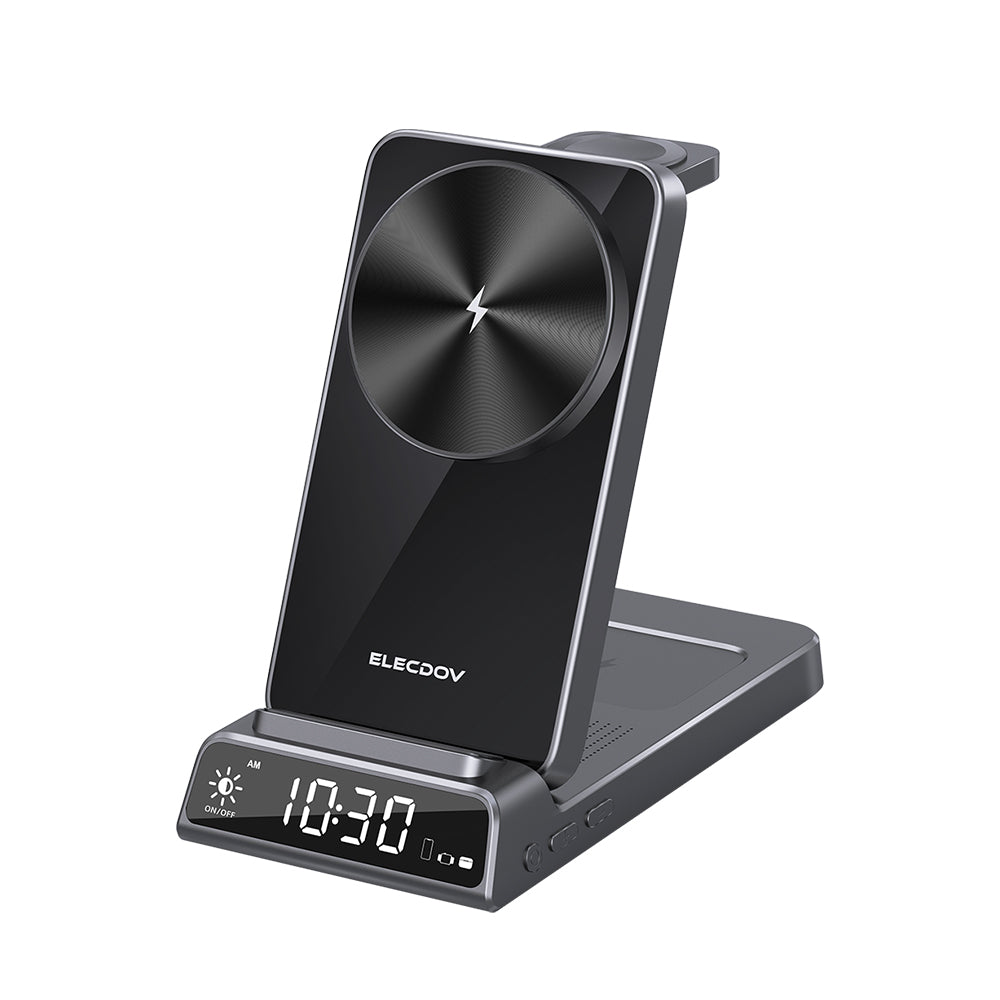
Elecdov CE19S 3-in-1 Magnetic Charging Station for Galaxy S26 Series, Watch9 / Ultra2 & Buds4 / Pro
SKU: CE19S · Built-in digital clock · USB-C and USB-A outputs · Plug included
- 3-in-1 magnetic charging with a built-in digital clock display.
- Extra wired outputs: USB-C 5V⎯3A or 9V⎯2A, and USB-A plus USB-C at 5V⎯3A, 15W max.
- Verified on the listing against Galaxy S26 Ultra, Watch 9, Watch Ultra 2, Buds4 Pro and Buds4.
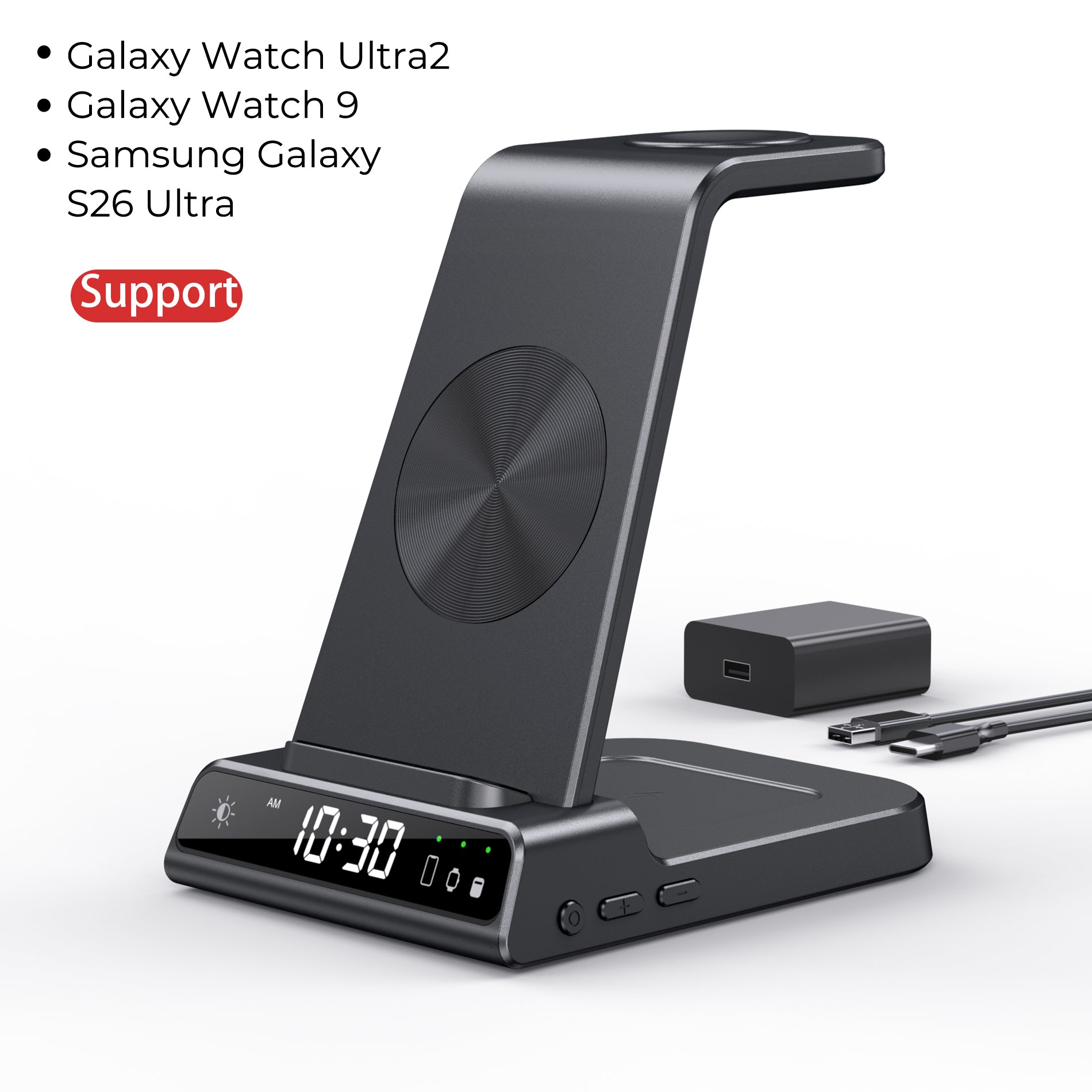
Elecdov C01 3-in-1 Magnetic Charging Station for Galaxy S26 Series, Watch Ultra2 / Watch9 & Buds
SKU: C01S · Dimmable digital clock · Plug included
- 3-in-1 magnetic charging with a built-in dimmable clock display.
- Compact body at 4.88 × 3.62 × 5.31 in, sized for a narrow table.
- Verified on the listing against Galaxy S26 Ultra, S26+ and S26 FE, Watch 9 and Watch Ultra 2.
Side by side: what actually differs
Five rows decide the purchase: whether the watch bay names your watch, how fast the phone pad is, whether there is a clock worth dimming, how much table the body claims, and whether anything else can be plugged in.
| W103S Pick 01 |
CE19S Pick 02 |
C01S Pick 03 |
|
|---|---|---|---|
| Charging bays | 3 (phone + watch + Buds) | 3 plus USB-C and USB-A outputs | 3 (phone + watch + Buds) |
| Phone pad output | 25W (max) | 15W (max) | 15W (max) |
| Watch dock output | 2.5W (max) | 2.5W (max) | 2.5W (max) |
| Galaxy Watch 9 named on listing | Not stated on the listing (names Watch Ultra, Watch 8 and older) | Yes — Watch 9 and Watch Ultra 2 | Yes — Watch 9 and Watch Ultra 2 |
| Buds case output | 5W (max) | 5W (max) | 5W (max) |
| Extra outputs | Not stated on the listing | USB-C 5V/3A or 9V/2A; USB-A + USB-C 5V/3A, 15W (max) | Not stated on the listing |
| Input | 15V⎯3A / 20V⎯2.25~3.25A | 5V⎯3A / 9V⎯3A / 12V⎯3.75A | 9V/2A · 5V/3A |
| Wall plug included | Yes | Yes | Yes |
| Clock display | Not stated on the listing | Built-in digital clock | Built-in dimmable digital clock |
| Stand / mount | Magnetic auto-alignment, portrait or landscape; foldable | Foldable body, strong magnetic grip | Phone stand; foldable body |
| Dimensions & weight | 2.76 × 0.25 × 5.20 in · 11.43 oz | 6.89 × 6.10 × 1.97 in · 12.70 oz | 4.88 × 3.62 × 5.31 in · 11.99 oz |
| Best spot at the bedside | Nightstand where the phone is the fast-charge priority | Wide nightstand needing a clock and spare ports | Narrow table with no space for a separate clock |
W103S — fastest phone pad, caveat on the watch. You get 25W max on the phone, a cooling fan, and the smallest footprint. You give up the clock, and the watch line stops at Watch Ultra and Watch 8 — so a Watch9 owner is buying a phone charger with a bay of unconfirmed fit.
CE19S — the bedroom default. A watch bay naming Watch 9 and Watch Ultra 2, a clock, and USB-C plus USB-A outputs. You give up 10W of phone headroom and take on a larger footprint — 6.89 inches across is a real claim on a small table.
C01S — the compact clock choice. Same watch evidence as the CE19S, a dimmable clock, a body narrow enough for a tight nightstand. You give up the wired outputs, and the Buds list omits Buds4 Pro, so a newer case needs checking.
Still unsure? Is the bedroom watch a Watch9 or Watch Ultra2? If yes, strike the W103S and choose CE19S or C01S on table width — spare ports or a tighter body. If it is a Watch 8 or older, all three are in scope and the W103S's 25W pad decides it. Then check the Compatible Devices list against your exact devices.

The ten-day routine, as a bedside checklist
Two nights of valid data within 10 days means the routine has to work on ordinary weeknights, not in a staged test. Six physical steps:
- Put the watch on before you get into bed. A watch left on the dock contributes nothing to the two-night window.
- Give the watch point the front edge, so the morning drop needs one hand and no aiming.
- Leave the band loose where the case meets the coil. Samsung notes some bands hold the watch off the surface.
- Keep the phone off the watch bay. An overnight phone there is the commonest way a morning top-up is skipped.
- Clear coins, keys and cards — Samsung warns metal and magnetic objects can interfere and cause overheating.
- Give the station its own adapter rated at least 5 V and 2 A, and keep it out of the bedding.
None of it costs anything, and one bad placement undoes it. For bay-by-bay detail on the newest watches, the C01S compatibility walk-through shows what a listing has to say before you trust a watch bay.
| Point | What it means at the bedside |
|---|---|
| Watch on wrist before bed | Two valid nights in ten days is the whole requirement; a docked night counts for nothing. |
| Front edge, one hand, band free | The morning charge happens in a hurry or not at all. |
| Clean surface, own adapter | Metal off the pad, airflow around the body, 5 V / 2 A behind it. |

The takeaway: the bedside now runs two shifts
The interesting part of Samsung's November announcement is not the algorithm. It is that a health feature has changed what a piece of furniture is for: the nightstand now runs a long overnight shift for the phone and Buds, and a short, unforgiving morning shift for the watch.
Design for the short shift: watch point where a hand reaches it in daylight, a listing that names your watch, a real adapter behind the station, a dimmed clock. No new furniture required — only the decision to stop treating the three bays as interchangeable.
- Watch bay that names Galaxy Watch 9 or Watch Ultra 2 on the listing
- Watch point at the front edge, phone at the rear
- Adapter rated at least 5 V / 2 A, on its own socket
- Dimmable clock, no screen facing the pillow
Frequently asked questions
Does the upgraded Sleep Apnea feature require wearing the Galaxy Watch overnight?
Yes. Samsung describes the feature as detecting signs of moderate to severe sleep apnea over a two-night monitoring period and states that it requires two nights of valid data within a 10-day period, so the watch has to be worn in bed. It is intended for users 18 and older and is not for anyone already diagnosed with sleep apnea.
Which devices get the upgraded Sleep Apnea feature first?
Samsung's announcement covers Galaxy Watch and Galaxy Ring, and the footnote names Galaxy Watch 9 while stating that support for Galaxy Watch 7 and 8 will expand through future software updates. The feature runs through the Samsung Health Monitor app as an over-the-counter, software-only application, not a diagnosis.
Can I charge a Galaxy Watch9 from my Galaxy phone with Wireless power sharing?
No. Samsung's charger guide states that the Galaxy Watch Ultra2 and Galaxy Watch9 series do not support Wireless power sharing, and that the feature is not supported on the Galaxy Watch7 series and newer Galaxy Watch models. A dedicated watch charging point is the reliable path.
Why does the watch charge slowly on an older charging pad?
Samsung states that using an older wireless charging pad with a Galaxy Watch9 or Galaxy Watch Ultra2 results in slower charging, and recommends the accessory included with the watch or a Samsung accessory confirmed for the model. The included charger's power adapter should provide at least 5 V and 2 A.
Where should the watch dock sit if the watch sleeps on my wrist?
Put the watch position at the front edge of the bedside station, where you can set the watch down flat with one hand in daylight, and leave the rear of the surface to the phone. Samsung notes that some watch bands prevent the watch from resting flat against the charging surface, which can interrupt charging.
Do I need a 3-in-1 station if the watch only charges in the morning?
Not strictly, but the arithmetic usually favours one. The phone and earbuds case still occupy the night slot, and a listed watch point gives the morning top-up a fixed place instead of a loose puck. Check that the product page names your exact watch model.
If this bedroom needs one box, the CE19S fits the new schedule: its Compatible Devices list names Galaxy Watch 9 and Watch Ultra 2 as well as Buds4 Pro, it carries a built-in digital clock, and it adds USB-C and USB-A outputs. The phone pad is published at 15W max — the honest trade for the watch evidence and the ports.
Related reading
- The 5 Wireless Charging Mistakes Every Galaxy S26 Ultra Owner Makes — And the Fix The phone-side version of the same lesson: alignment, cases and heat, at a nightstand as much as a desk.
- Innovation in Nightstand Charging: Five Trends from Cable Chaos to Wireless Aesthetic Hub How a bedside surface stops looking like a power strip — the design direction Section 05 draws on.
- Qi2.2 Meets Home Design: How 25W Wireless Charging Is Transforming Bedroom and Living Room Aesthetics Where the 25W phone tier sits in a room, for readers weighing the W103S against the two 15W stations.
- 10 Questions About Samsung Galaxy Desk and Home Charging, Answered A Q&A catch-all for the compatibility questions that surface once the layout is settled.
- The Best Nightstand Charging Station in 2026: A Qi2.2 Buying Guide for a Cable-Free Bedside The broader buying framework, if you are still choosing rather than placing.
Find the station that fits your nightstand
Bays, phone-pad power, watch compatibility, clock and footprint — the same table, one click from the product pages.
See the C01 stationSources: Samsung Newsroom, Upgraded Sleep Apnea Feature Now Available on Galaxy Ring (3 November 2026); Samsung Support, Find the right charger for your Samsung Galaxy Watch (updated 26 August 2026); Elecdov listings for W103S, CE19S and C01S. Specifications are quoted as published and may change. The feature is an over-the-counter software application, not a diagnosis, and does not replace assessment by a clinician.


